

In the latest infrastucture development plans there is an upgrade of a SQL 2008 R2 cluster to 2012, which will provide place later to SQL Server Reporting instances for SCCM and SCOM 2012 R2. It’s a perfect occasion too to rename the virtual SQL Server’s name, because it wasn’t align with the name convention. And you don’t do it day-by-day, so it’s better to be prepared. However, I wasn’t well enough… 🙂
Based on the documentation it’s not a rocket science. You can do it in Failover Cluster Manager by simply rename the DNS name property of the required SQL instance and restart the service.
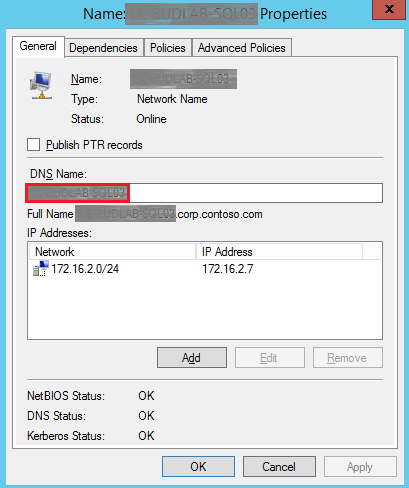
I have 2 databases on this instance, one for SCCM and one for WSUS. Obviously you have to reconfigure your applications to the new SQL name after rename. In my case these tasks are not complicated, SCCM SQL configuration can be modified with Configuration Manager Setup and WSUS can be reconfigured by updating the value of “SqlServerName” under the following registry key:
HKEY_LOCAL_MACHINE\SOFTWARE\Microsoft\Update Services\Server\Setup
With these knowledge in my pocket I started to do the modifications. Of course a SQL backup/snapshot backup is inevitable! I renamed the clustered SQL name successfully, but the Configuration Manager Setup was not satisfied:

The log (as usual) was not fully clear:
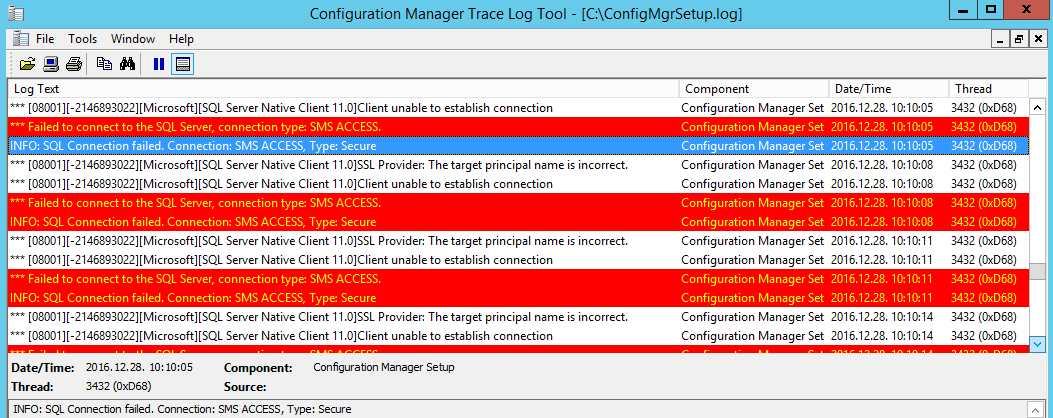
At first, I suspected to the SPNs which were missing indeed, however after granting the necessary permissions to the SQL service account to successfully create those SPNs wasn’t solved the error.
The rest of my morning took with diligently Googleing and the more relevant solution I found looked like to change SQL2012 native client to SQL2008. Since this still didn’t helped I turned my attention to SQL certificates. After my suspicion confirmed in this forum post I started to create a new certificate for my SQL server virtual name and deployed it to both cluster nodes and the SCCM site server. I was almost done, but the SQL instance still loaded the old certificate as it written into SQL logs:

I updated the value of the “Certificate” in the below registry key and finally the SCCM site maintenance wizard successfully finished (with some minor hiccups regarding the original prereq folder location) as well as the SQL virtual server renaming procedure:
HKEY_LOCAL_MACHINE\SOFTWARE\Microsoft\Microsoft SQL Server\MSSQL10_50.SCCM\MSSQLServer\SuperSocketNetLib